After reading the (tech) news for a while I noticed that I spent a lot of time re-checking sites. Everything has a "for you page" or a "feed" these days.
Being able to subscribe was great on my laptop, but switching devices more often theses days requires an online service.
After some searching I found miniflux that aims to be good at being self-hosted. So, I registered a new sub-domain and tried it.
miniflux setup
Thanks to their excellent docs it was relatively simple to setup.
Just make sure that you don't bind to the public internet directly. Bind to
127.0.0.1:6397 instead and the use nginx or another reverse proxy to protect
the service.
This is the compose file I use:
name: miniflux

services:
    miniflux:
        image: miniflux/miniflux:latest
        ports:
            # do not expose to the internet
            - "127.0.0.1:6397:8080"
        depends_on:
            db:
                condition: service_healthy
        environment:
            - DATABASE_URL=postgres://miniflux:secret-to-change@db/miniflux?sslmode=disable
            - RUN_MIGRATIONS=1
            - CREATE_ADMIN=1
            - ADMIN_USERNAME=dns2utf8
            - ADMIN_PASSWORD=change_me_now_2026
        healthcheck:
            test: ["CMD", "/usr/bin/miniflux", "-healthcheck", "auto"]
    db:
        image: postgres:18.1-trixie
        environment:
            - POSTGRES_USER=miniflux
            - POSTGRES_PASSWORD=secret-to-change
            - POSTGRES_DB=miniflux
        volumes:
            # You may have to adjust the volume path depending on the version of Postgres
            # Postgres 18 uses /var/lib/postgresql
            # Postgres 17 and below uses /var/lib/postgresql/data
            # See https://hub.docker.com/_/postgres#pgdata
            - /srv/docker/miniflux/data/:/var/lib/postgresql
        healthcheck:
            test: ["CMD", "pg_isready", "-U", "miniflux"]
            interval: 10s
            start_period: 30s
# Use a folder for better persistence and easy backup
#volumes:
#  miniflux-db:
My first impressions
It is super fast. With just one feed registered it responds almost instantly, faster than my local application did before.
Use-case youtube
Yes, it is not great, but some videos are just there.
So to waste less time on the platform, just subscribe to the creators I actually want. However, the best part is that I can limit the feed to just videos.
This has become essential as most channels nowadays blast short clips of their long content in-between the releases to please the algorithm. So only getting a notification or entry when there is actually a new video is a blessing.
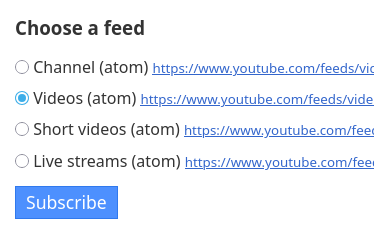
Finally, click the "mark all as read" button if you are already caught up or select the ones that you have seen already one by one.
Block topics in a feed
Another great feature is the blocking filters.
I follow a comedy channel that mixes their shows with their podcast.
Adding this to "Entry Blocking Rules" removes all the podcast entries that I don't care for, ignoring case:
EntryTitle=(?i)talk ohne gast
Use-case public broad-cast
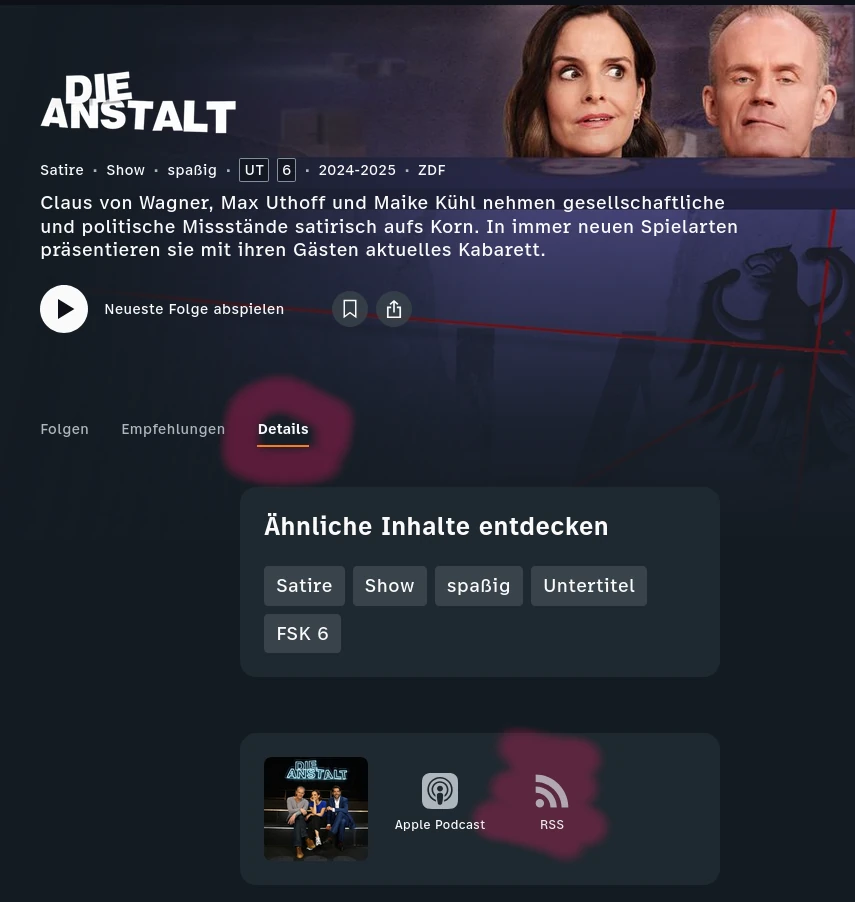
Some stations like ZDF have a semi-regular schedule because of holidays and big events.
The feed is a bit hidden but you can find it when you:
- go to the show you like
- go to the "Details" tab
- scroll down and copy the link to the rss feed
Github releases have a feed
Getting notified when there is an update with rss.
For example to get notified of a new version of this software add the release URL:
- https://github.com/miniflux/v2/releases
This is great because now between getting you news you get your updates.
Second impressions
After having a lot of feeds and using it, it is still super fast. It feels like the old internet is back, but with modern features and modern response times.
Custom CSS
The top bar was a little hard to reach. Luckily there is a feature that allows an admin to just configure it:
header.header nav {
    font-size: 1.2rem;
}
The history feature
This is the feature I use a lot at the moment because sometimes I click the wrong button.
 Donate ♥
 Imprint
 Datenschutz
 Archive